
Product Support
How to Set Up Your Water Filter Faucet System
Instructions
STEP ONE
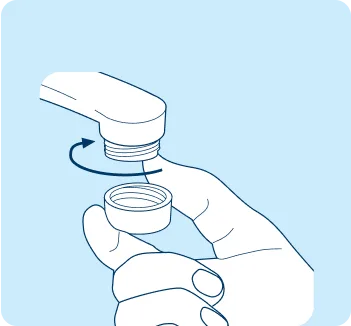
Remove aerator
Easy to install. No tools required. Remove aerator from faucet.
STEP TWO
Check for adapter needs
Check threading to determine if an adapter is needed.
Inside: Use an adapter.
Outside: Likely no adapter needed.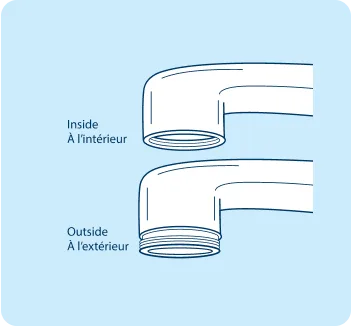
STEP THREE
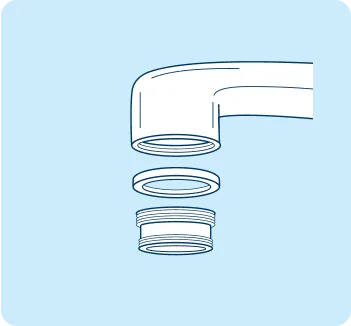
Optional: Install washer and adapter
If needed, install washer and adapter. You may need to experiment with different pairings to see what works.
STEP FOUR
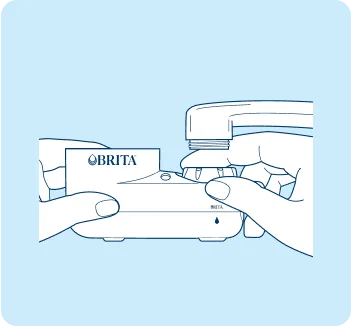
Mount the base system
Screw base system to faucet. No tools required.
STEP FIVE
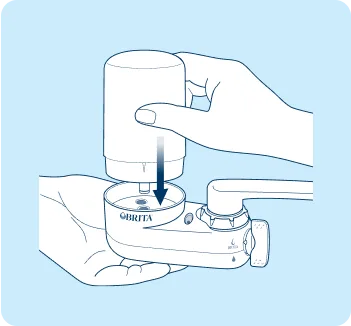
Attach filter
Support the base and click filter into filter cup.
STEP SIX
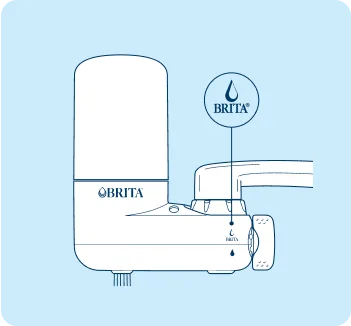
Switch settings
Turn to Brita™ filtered water setting and flush with cold water for 5 minutes.
STEP SEVEN
Filter replacement indicator
The Filter Replacement Indicator monitors the filter life and tells you when to replace the filter cartridge based on average water quality and filtered water usage by the average family. The Filter Replacement Indicator will signal the need for replacement after approximately 100 gallons/378 liters.
Solid Green: No change needed.
Green and Red: Filter has approximately 20 gallons of life left
Solid Red: Time to change filter.STEP EIGHT
1-click filter replacement
Press the release button to pull out the filter. Insert the new filter into the base. Flush 5 minutes (tip: use this water to water your plants!)
Faucet Mount FAQs
See all FAQs- Support the bottom of the filter system with one hand.
- Align the insert groove on the lower part of the cartridge with the filter indicator at the front of the filter cup.
- Insert the filter cartridge into the filter cup until you hear it click into place. Do not force the filter cartridge into the system base.
- Inserting the new filter cartridge automatically resets and activates the electronic filter change indicator.
- A green signal will flash, indicating that the filter is engaged.
- Filters for Brita™ Water Filter Faucet Systems don’t require soaking. Just run water through the system for 5 minutes to flush it out, which activates the filter media and remove any carbon dust.
- The 100-gallon filter life begins AFTER flushing for 5 minutes, so you’re not wasting any filter life by the flushing process. Tip: Contain the water from the flushing process and use it to water plants.
- Press the filter cartridge release button located at the back of the filter cup and pull cartridge up to remove it
- Align the insert groove on the lower part of the cartridge with the filter indicator at the front of the filter cup
- Insert the filter cartridge into the filter cup until a “click” is heard
- Turn on the faucet to flush the new filter for 5 minutes to remove any carbon dust and activate the filter


