
Brita™ Water Dispensers FAQs
Find quick answers to the most-asked questions.
Replacement Filters
Only potable drinking water should be filtered through your Brita™ Dispenser. Do not filter any other liquids including alcohol, juice, or non-potable water.
It's important to change your filter as recommended for optimal performance. If you have hard water, you may need to change filters more often. Use your cling calendar, or activate your electronic filter change indicator, when you install a new filter to help keep track of your usage. Filter replacement depends on filter and product type.
Pitcher and Dispenser Filters
- Brita™ Original (Standard) (White) Filter: Every 40 gallons (about 2 months)
- Brita Elite™ (Blue) Filter: Every 120 gallons (about 6 months)
- Brita Stream® (Gray) Filter: Every 40 gallons (about 2 months)
Bottle Filters and Faucet Mount Filters
- Brita™ Premium Filtering Water Bottles: Every 40 gallons (about 2 months)†
- Brita™ Water Filter Faucet System Model SAFF-100: Every 100 gallons (about 4 months)
- Brita™ Water Filter Faucet System Model FF-100: Every 100 gallons (about 4 months)
Time estimates for Brita™ pitchers, dispensers and Water Filter Faucet Systems are based on 11 glasses per day for an average household. Approximate timing for Brita™ Premium Filtering Water Bottles is based on 64 ounces per day.
Blue Brita Elite™ Filters last up to six months (120 gallons) on average, three times longer than our Original (Standard) Filters. If you purchased your Brita™ pitcher or dispenser before 2019, your filter change indicator may not track Elite™ Filter life. The following questions address how to track Elite™ Filter life for these older models:
I have an electronic filter indicator. How do I track my Brita Elite™ Filter life?
If the electronic filter indicator on your pitcher or dispenser lid looks like the image below, then you’re all set to track Elite™ Filter life. Instructions are in the User Guide. If your electronic filter indicator does not look like the image below, it can only track the filter life of Original (Standard) Filters, and not Elite™ Filters. To track your filter life, you can sign up for personalized filter change reminder emails so you’ll always know when it’s time to change your filter.
I have a sticker filter indicator. How do I track my Brita Elite™ Filter life?
If your sticker indicator looks like the image below, you’re all set to track Elite™ Filter life. See instructions below.
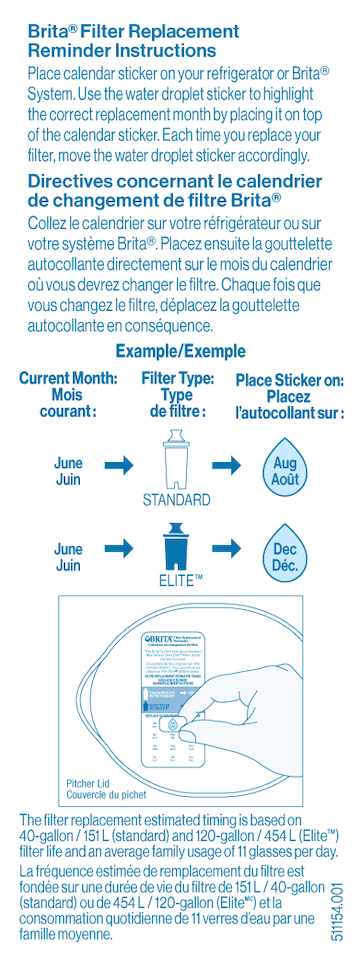
If your sticker indicator does not look like the image, it’s an older version. But, you can still use this indicator to track Elite™ Filter life. Place the right side of the sticker on top of the month six months after you change your filter. For example, if you change your filter in January, place the left side of the sticker over “Jan” and place the right side of the sticker diagonally over “June.” Then you’ll know to change your filter in June. To track your filter life, you can sign up for personalized filter change reminder emails so you’ll always know when it’s time to change your filter.
All Brita™ filters are certified to reduce chlorine taste and odor for great-tasting water. Some of our filters also reduce health contaminants such as copper, cadmium, mercury, and lead. Substances that Brita™ products filter may not be in all users' water. Note: For fluoridated municipal tap water, Brita™ filters keep a healthy level of fluoride, a water additive that promotes strong teeth.
This page lists all the contaminants our filters are certified to reduce or remove for great-tasting water.
The shelf life of an unused Brita™ filter is indefinite as long as its pouch is intact and sealed. However, we do recommend pre-soaking older Original (Standard) filters in water for 15 minutes before using.
Care & Maintenance
Just a few simple steps and you're on your way to enjoying healthier, great-tasting water with your Brita™ dispenser—no more need to soak!
- Wash hands and remove filter from bag.
- Hand-wash system periodically with a mild detergent (no abrasive cleaners). Rinse well. Do not wash in dishwasher.
- Insert filter into reservoir by lining up groove in filter with notch in reservoir. Press firmly for a tight seal. Fill the reservoir with cold tap water. Discard your first dispenser of filtered water or use it to water plants.
- Set up your pitcher’s electronic indicator for use with the Original(Standard) or Elite Filter or using the sticker indicator provided.
Remove the filter and hand-wash the lid and reservoir with a mild soap. (Never use abrasive detergents or a dishwasher).
Avoid filling above the MAX FILL line. The purpose of this line is to help you avoid overfilling the reservoir, which can cause water to spill into the handle and leak out of the pitcher.
Seeing carbon particles in the dispenser after several weeks of use is normal with our older filters.
Although built to last, Brita™ products can crack or break due to a variety of unfortunate circumstances. We stand by our products and offer both a 30-day, unconditional, 100% money-back guarantee and a 1-year warranty in case your Brita gets damaged. Your satisfaction is important to us, whether or not you are within the warranty period. Please don’t ever hesitate to contact us via this page or call 1-800-24-BRITA for support.
Yes. All Brita™ pitchers, dispensers, Premium Filtering Water Bottles, Water Filter Faucet Systems and replacement filters are made without BPA.
Purchase online here or check out our complete list of retailers.
For models that feature our Electronic Filter Change Indicator, Brita uses a Lithium Manganese Dioxide (Li/MnO₂) battery, which is a type of lithium-ion battery.
Currently, the following Brita models use this battery type:
Brita Champlain Pitcher Model No. OB61
Brita Denali Pitcher Model No. OB62
Brita Marina Pitcher Model No. OB47
Brita Pacifica Pitcher Model No. OB41
Brita Tahoe Pitcher Model No. OB60
Brita Ultramax Pitcher Model No. OB24
Brita Wave Pitcher Model No. OB53
Brita Everyday Pitcher Model No. OB46
Brita Metro Pitcher Model No. OB11
Brita Faucet Mount Model No. FF-100Brita Stream® Dispenser
This indicator is designed to blink a ‘status’ light every time the spigot handle is open. If the filter is good to use you will see a green light slowly blinking 3 times. Once you reach 40 gallon the light will frantically blink 5 times, letting you know it’s time to get rid of the old filter and place a new filter on the spigot.
You’ll find a wrapped filter inside the cardboard base of your dispenser’s carton.
If your indicator was activated properly, you should see a green light blinking on your spigot every time you open the spigot handle. If it has not been activated properly, once you open the spigot handle you will see only one red flash after 2 seconds. To activate you need to open the spigot handle and press the button 3 times.
There is a feature on this indicator that makes effortless to replace your filter reset your indicator. Once your indicator is blinking red, you just need to take the old filter out, place a new filter (already rinsed for 15 seconds) and the indicator light will shine green/red for 5 times to confirm a successful reset. Every time you open the spigot you will now see the green light again.
Manuals & Warranties
We stand by our products and offer a 30-day unconditional 100% money-back guarantee and a 1-year warranty in case your Brita gets damaged. Your satisfaction is important to us, whether or not your Brita™ product is under warranty. Visit our Help Page or call 1-800-24-BRITA or 1-800-387-6940 (Canada) for support.
